Quiet hours
Quiet hours hold the handset, the answering machine and the network phones off a ringing call for windows of the day you write. It is not a do-not-disturb flag on one device: it is the line itself deciding not to make noise.
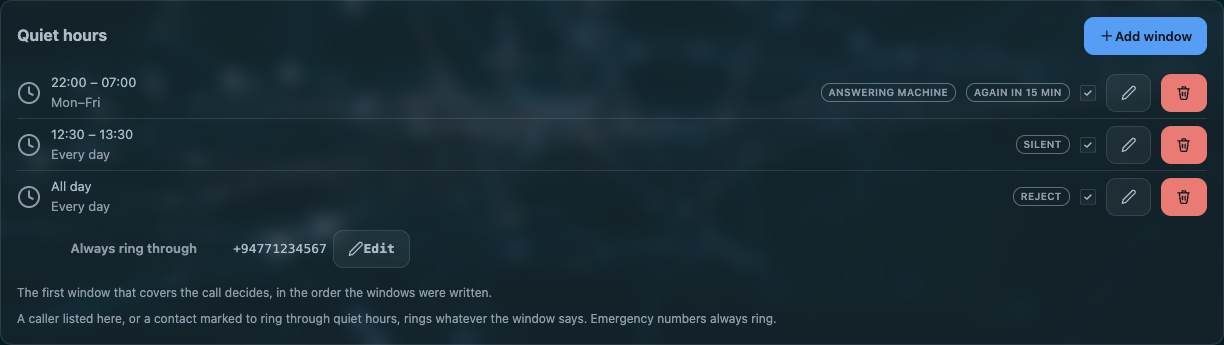
The controls are on Rules → Quiet hours. Nothing is honoured out of the box: with no window written, the phone rings at every hour.
A window
| field | what it means |
|---|---|
| Enabled | a per-window switch, so you can keep a window written without it acting |
| All day | the whole 24 hours. The two time fields disappear when you tick it |
| From / To | HH:MM to HH:MM. A from later than its to runs through midnight — 22:00 to 07:00 is tonight into tomorrow morning, not nothing |
| Days | which weekdays count. Three-letter names only: sun mon tue wed thu fri sat |
| Mode | what happens to a call that arrives inside the window. See below |
| Again in | minutes before the same caller is let through again. New windows start at 15; 0 turns that answer off |
Up to eight windows. The first window that covers the moment decides, in the order they are written, so a narrow window has to sit above the broad one that would also match.
The three modes
| mode | what happens to a call that arrives inside the window |
|---|---|
| Silent | the line stays silent. The page says Call held quiet, its Answer button takes the call, and lifting the handset answers it too |
| Answering machine | the call goes to the machine. This needs the machine switched on; with it off the caller hears nothing from this side until the network ends the call |
| Reject | the caller is released |
The machine mode is a promise you have to keep elsewhere
A window set to Answering machine on a router whose machine is off leaves the caller listening to nothing. If you want the machine to take night calls, switch it on in Phone settings → Answering machine as well.
Who reaches you anyway
| an emergency number | always. Nothing on this router blocks one, whatever a window says |
| a number on the ring through list | the window's own list, and the page's Always ring through list, joined into one list of at most twenty numbers |
| a number of a contact marked Ring through quiet hours | recognised however the network happened to write the number, because the match is made in international form |
| the same caller, again | a caller who tries a second time inside the window's Again in minutes gets through. This is what makes a genuine emergency from a fixed line survive a silent window |
The Always ring through button is disabled while no window exists — there is nothing to ring through to.
Doing it by hand: *78, *79 and #
| you dial | what happens |
|---|---|
*78 |
ask for quiet now, whatever the windows say |
*79 |
give that up |
either, followed by # |
the same, with the send key. Both forms are accepted |
They work on the handset and in the page's dialler. A hand-asked quiet is remembered across a save of anything else, and falls back to the written windows when the service restarts — the ask is not stored as a window.
The clock rule
Nothing is honoured from a schedule before the router knows what time it is.
An unknown clock never quiets the line
A router whose clock still reads 1970 would match every window or none, so with an untrusted clock the line rings normally. A quiet you asked for by hand needs no clock at all, because it is not a schedule.
The Health tab reports what the line answered a moment ago and what decided it: whether quiet is
on, the cause — window, all-day or manual — and what was asked for.
Settings
Quiet hours are one dnd section per window in /etc/config/awvoice:
# one window: weekdays, 22:00 to 07:00, the machine answers, the same caller may try again in 15 minutes
config dnd 'night'
        option enabled '1'
        option from '22:00'
        option to '07:00'
        option days 'mon tue wed thu fri'
        option mode 'machine'
        option repeat_min '15'
        list allow '+94771234567'

config contact 'family'
        option name 'Family'
        option ring_through '1'
| option | values | default | meaning |
|---|---|---|---|
enabled |
0|1 |
1 on the page |
does this window act |
from, to |
HH:MM |
22:00, 07:00 on the page |
the window. Past midnight is normal |
all_day |
0|1 |
0 |
the whole day |
days |
three-letter weekday names | all seven on the page | which days |
mode |
silent, machine, reject |
silent when unset |
what happens inside |
repeat_min |
0–1440 |
15 on the page |
minutes before the same caller is let through; 0 is off |
allow |
a list of numbers | empty | ring through. Twenty across all windows |
A contact section with ring_through '1' needs nothing written in any window.
When it does not do what you expect
| symptom | what it means |
|---|---|
| The phone rings during a window you wrote | the window's enabled, or its days, or an earlier window that also covers the moment and says something else |
| Nothing rings, ever | a window with all_day, or a window whose times cover 24 hours. Check the order |
| The caller hears nothing at all | mode is Answering machine and the machine is off, or mode is Silent and nobody takes it |
| A number on the ring-through list still gets held | the stored form does not match. Matching is done in international form, so 0771234567 and +94771234567 are the same caller only when the numbering plan says so |
| Quiet came on at the wrong hour | the router's clock. Set your time zone |
*78 did nothing |
the digits were collected as a dialled number. A service code needs to be dialled as a code, and the send key does not act inside it |
Questions people ask
Can I stop the AW1000's phone from ringing at night?
Yes. Rules → Quiet hours takes up to eight windows with times, weekdays or all day, and three answers for a call that arrives inside one: stay silent, send it to the answering machine, or release the caller.
Can some numbers still get through quiet hours?
Yes: a per-window ring through list, a page-wide Always ring through list — twenty numbers across them — any contact marked Ring through quiet hours, and the same caller trying a second time within the window's repeat minutes.
Does quiet hours stop the answering machine too?
It depends on the window's mode. Silent holds everything quiet, Answering machine sends the call to the machine, and Reject releases the caller. The handset, the browser page and the network phones all follow the same decision.
What is *78 on a phone?
The code that asks for quiet now, without writing a window. *79 gives it up. Both work on the
handset and in the page's dialler, with or without the send key.