Calls
The Calls tab is the line's memory: every call the router handled, in one list, newest first, with whatever that call left behind attached to it.
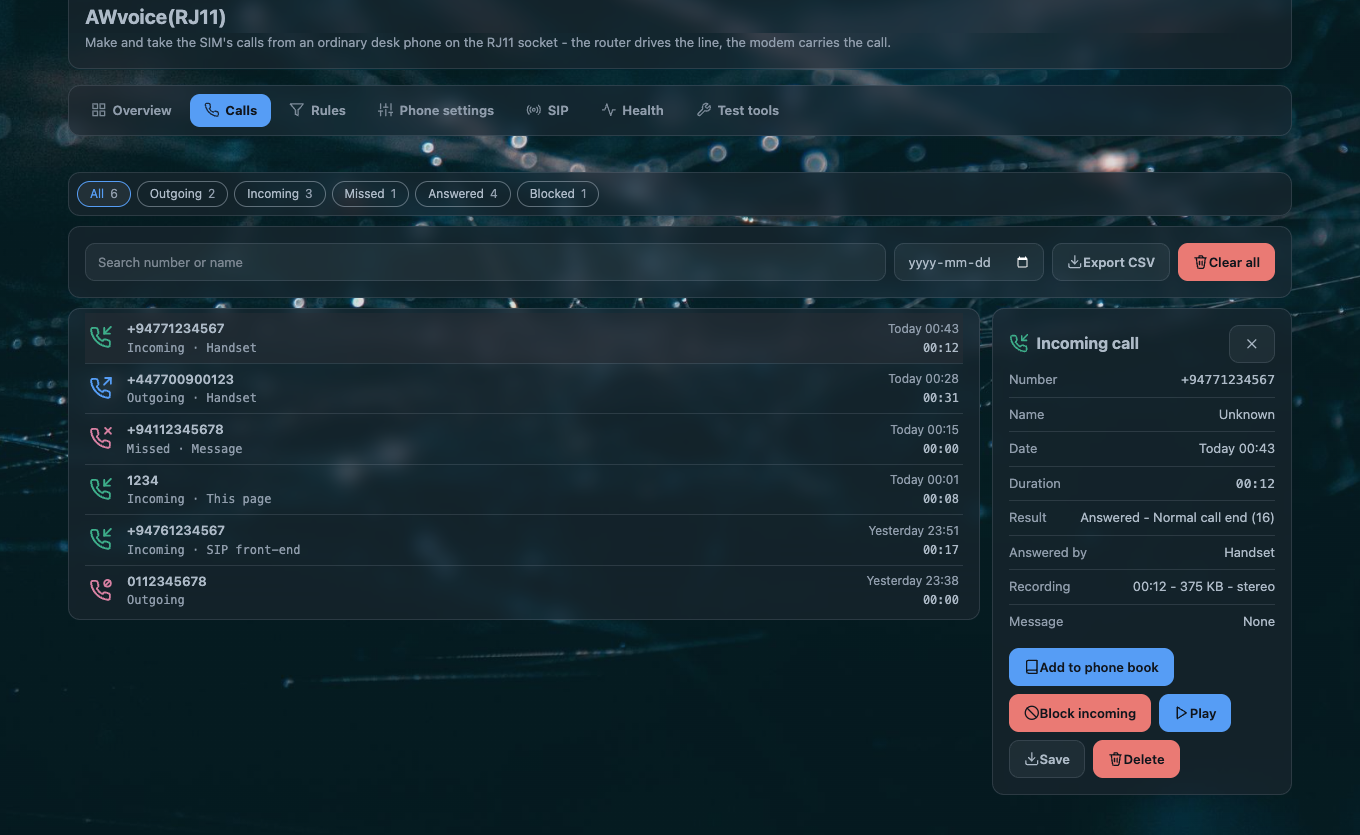
What one call record holds
| field | what it says |
|---|---|
| type | IN an incoming call, OUT one you placed, MISS a call that rang and was not taken |
| number | the digits the network sent, shown in the form your numbering plan says. A contact's name from the phone book replaces it when the digits match |
| time | when the call was decided, from the router's clock |
| duration | seconds of connected call. A missed call has none |
| outcome | one word: see below |
| cause | the reason behind the outcome when there is one to give |
| answered by | only when someone took it: handset, machine, web or sip |
| recording | the file this call was recorded to, when recording was on |
| message | the answering-machine message this call left, when it did |
| outcome | what happened |
|---|---|
answered |
the call was taken and connected |
missed |
it rang and nobody answered. The network ended it |
no_answer |
the call was never answered from this side, recorded separately from a plain miss |
rejected |
you refused it — the handset's code, the page's Reject, or a quiet-hours window set to release callers |
blocked |
a rule stopped it before it rang |
busy |
the line was engaged |
failed |
the attempt did not get through: no service, the modem refused the dial, or the network released it |
What the log never holds
A name is not stored, only the digits and, at display time, the phone-book entry they match.
A recording or message file name never contains a phone number — a file is named for the
call's time and its id, so a leaked file is not a leaked contact list. The service log
(logread) carries no numbers either; the display form of a number is a property of the page.
Reading the list
The tab carries the line's state at the top and the list below it.
| control | what it does |
|---|---|
| the search box | matches digits or a contact name as you type |
| the filter chips | All, Outgoing, Incoming, Missed, Answered, Blocked. The last two are views on the outcome, not kinds of call, and each chip carries its count |
| From date | limits the list to calls from that date on |
| Export CSV | the list as it currently stands, filters included: Type, Number, Name, Date, Duration (s), Result, Answered by, Network cause |
| Clear all | empties the log. It is disabled while a result filter is showing, because the daemon deletes by call type |
| a call's own card | opens under the row: the fields above, and the audio controls for whatever this call left behind |
A card's audio controls are play, save and delete, and they appear only when that call actually has something to play — a call with no recording and no message shows nothing extra. The card also offers Add to phone book, and Block incoming / Block outgoing for that number, which are absent when the caller withheld their number.
Where the log lives
Two copies, deliberately:
| path | what it is |
|---|---|
/var/run/awvoice-phoned/calls.json |
the working copy, in memory-backed storage, so a call that ends does not write to flash |
/etc/awvoice/calls.json |
the copy on flash, which is what survives a reboot |
The daemon flushes its in-memory log when it stops, so the two agree after a clean restart. If the
flash copy is ever unreadable — a cut write, a hand edit with a stray character — the daemon renames
it to calls.json.bad rather than overwrite it, and starts a fresh log. Your old records are still
in that file.
Both copies are kept across a sysupgrade, because the package ships a keep-list entry for
/etc/awvoice/. See files and ports.
Two limits worth knowing: the log holds the most recent 200 calls and drops the 201st, and the
memory copy is written down to flash at most every ten minutes, so a power cut can lose the last
few minutes of records. The flash copy is written as a temporary file and renamed, mode 0600, so
it is never half-written.
The outcome words in real life
| you want to know | read |
|---|---|
| who rang while you were out | type MISS, and the time |
| whether the answering machine took a call | answered by machine, and the message attached to that row |
| whether the browser page answered | answered by web |
| whether a soft phone answered | answered by sip |
| why a call you placed failed | outcome failed and the cause |
| whether a rule stopped a caller | outcome blocked — the rule that matched is on the Rules tab |
| whether quiet hours held a call quiet | outcome plus the cause word, and the Health tab says what decided the last call |
Settings on this page
The log itself has no options. What changes what appears in it:
| option | default | effect on the log |
|---|---|---|
record_enabled |
0 |
with it on, each answered call carries a recording |
machine_enabled |
0 |
with it on, unanswered calls carry a message and are marked answered by the machine |
region |
auto |
the form a number is displayed in. The stored digits do not change |
| phone-book entries | none | a matching number is shown as its contact name |
When the list looks wrong
| symptom | what it means |
|---|---|
| The list is empty after calls were made | the page reads the daemon, so an empty list with a running daemon means the flash copy was unreadable and a new log started. Look for /etc/awvoice/calls.json.bad |
| Calls are there but no recordings | recording is off by default. It records what it hears from the moment it is switched on, not the calls before |
| A recording is missing from an old call | recordings are attached after the fact: the log line and the file are separate, and a file deleted by the size budget leaves the call without one |
| Names show as numbers | the phone-book entry does not match the digits the network sent. The rules page explains how a number is matched |
| Times are wrong | the router's clock. Set your time zone; the log stores the moment, the page shows it in the browser's zone |
Questions people ask
Does CleanWRT keep a record of every call?
Yes, in the call log: type, number, time, duration and outcome for every call the router
handled. It is stored on the router under /etc/awvoice/ and survives an upgrade that keeps
settings. Nothing is sent anywhere.
Are call recordings kept on the router or somewhere else?
On the router only, as WAV files in /etc/awvoice/recordings/. There is no upload, no remote
storage and no network share involved. Play, save or delete them from the call's own card.
Can I export the call log?
The Calls tab exports what it is currently showing as CSV, filters included.
Does the log show who answered — the handset or the page?
Yes. A call someone took carries answered by: handset, machine, web or sip.